
For a plumber, a dental office or a roofing company, a missed call often means a customer who rings the next business on the list. Missed-call text-back is a simple fix: when nobody picks up, the caller gets a text from your business number straight away, so the conversation can carry on by SMS.
If you already have a Twilio number, you can build this yourself. This post walks through how it works, the Twilio pieces involved, the US texting rules you need to respect, and when a ready-made tool makes more sense than custom code. Twilio details were checked against Twilio’s documentation on 15 November 2026.
What missed-call text-back actually does
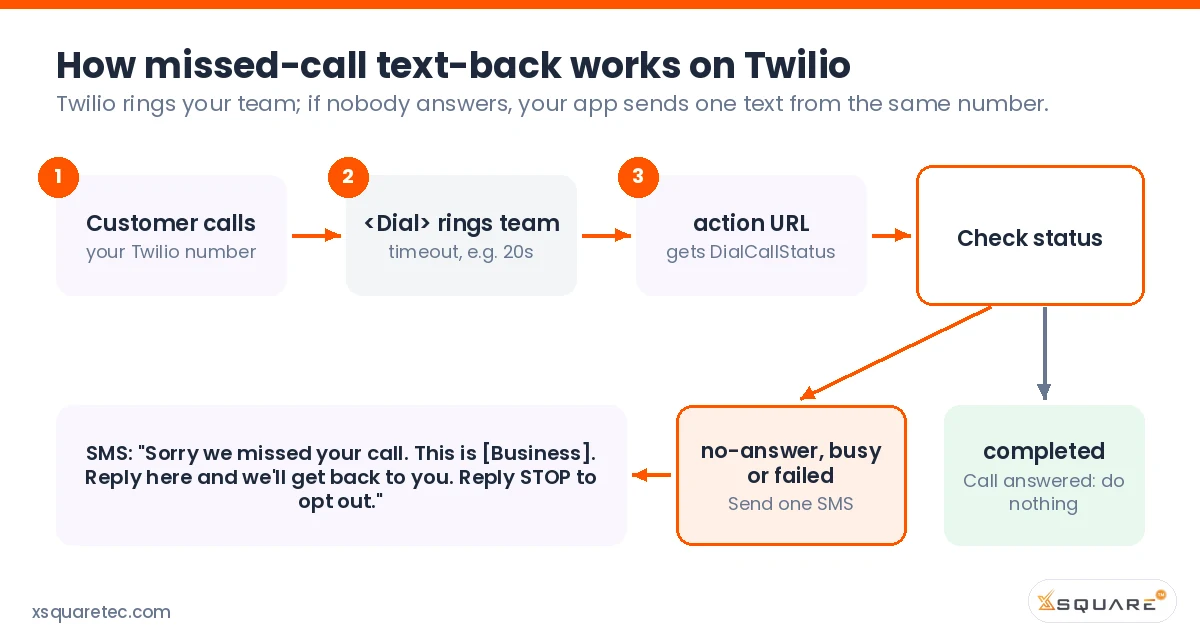
The flow is short:
- A customer calls your Twilio number.
- Twilio rings your team (a desk phone, a mobile, or several people at once) for a set number of seconds.
- If someone answers, it’s a normal call and nothing else happens.
- If nobody answers, the line is busy, or the call can’t connect, Twilio tells your app, and your app sends one text to the caller, for example: “Sorry we missed your call. This is Acme Plumbing. Reply here and we’ll get back to you. Reply STOP to opt out.”
- Replies come back to the same number, so your team can pick up the thread by text.
The build on Twilio, step by step
1. Answer the incoming call with TwiML
Point your Twilio number’s voice webhook at your app (or a Twilio Function). Your app replies with TwiML that uses the <Dial> verb to ring your team. You can dial one number, or put several <Number> elements inside one <Dial> so they ring together and the first to answer gets the call.
2. Set a ring timeout
<Dial> has a timeout attribute. Twilio’s docs say the default is 30 seconds, the minimum is 5 and the maximum is 600. Choose a value that suits your business, and keep it shorter than the time your mobile carrier takes to send calls to personal voicemail. Otherwise a cell phone’s voicemail “answers” the call and Twilio sees it as connected.
3. Use the action URL to learn what happened
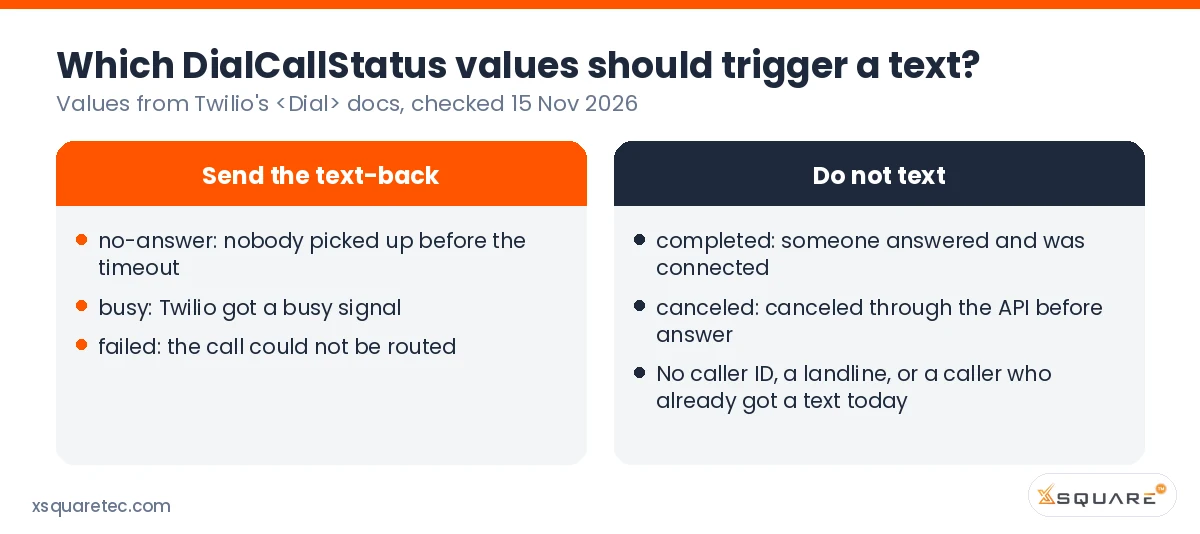
Add an action URL to <Dial>. When the dial attempt ends, Twilio requests that URL and includes a DialCallStatus parameter. Twilio documents these values:
completed: the person you dialed answered and was connected.busy: Twilio got a busy signal.no-answer: nobody picked up before the timeout.failed: Twilio couldn’t route the call.canceled: the call was canceled through the API before it was answered.
Your action handler checks the value. On completed, it just ends the call. On no-answer, busy or failed, it can play a short message or take a voicemail, and it triggers the text.
4. Send the SMS
Use Twilio’s Messaging API to send one text from your business number to the caller’s number (the From value on the incoming call). Send it through a Messaging Service that is attached to your registered 10DLC campaign (more on that below). Keep the message short, name your business, and include opt-out wording.
Writing the text-back message
Keep it to one SMS segment if you can (160 plain characters), because Twilio bills per segment. A good text-back says who you are, admits you missed the call, tells the caller what to do next, and offers a way out. For example: “Hi, this is Acme Plumbing. Sorry we missed your call. Reply with your address and the problem, or book online at acmeplumbing.com/book. Reply STOP to opt out.” Avoid sales offers here, since the message should match the use case you registered.
5. Handle replies and repeat callers
Set the number’s messaging webhook so replies land somewhere your team will see them: a shared inbox, your CRM, or an email or Slack alert. Add a simple rule so the same caller doesn’t get five texts after five quick redials. For example, send at most one text-back per caller per day.
Small details that matter
- Landlines can’t receive texts. If many callers ring from office lines, some texts will fail. Twilio’s Lookup API can tell you a number’s line type before you send, at an extra cost per lookup.
- Blocked or withheld caller ID. If there’s no usable caller number, skip the text.
- After-hours behavior. You may want a different message outside business hours, such as “We’re closed now and will reply in the morning.”
- Logging. Record each missed call and text so you can see what happened later, ideally against the contact in your CRM.
10DLC and consent: who you can text
If you text US customers from a local 10-digit number, Twilio expects you to register for A2P 10DLC: a brand plus a campaign describing this messaging. Twilio says unregistered traffic gets extra carrier fees and more filtering. Describe missed-call text-back honestly in the campaign: who receives it (people who just called you), and why (to follow up on their call). If your campaign is rejected, our guide to fixing a rejected 10DLC campaign covers the common error codes.
Consent is a separate question from registration. Whether a caller who rang you can lawfully receive a text back depends on the content and the law that applies: the TCPA and state rules in the US, and CASL in Canada. Keep text-backs purely about the call they missed, always honor STOP, and check your setup with your own lawyer. We build opt-out handling into these flows, but we don’t give legal advice.
Custom build or a ready-made tool?
You don’t always need custom code. Our own product, OpenVBX, runs on your Twilio account and includes missed-call text-back as a ready-made automation template, alongside call flows, two-way SMS and a CRM. If you want missed-call follow-up working without a development project, start there.
A custom build makes more sense when:
- the text-back has to live inside your own app or customer portal;
- the rules depend on data only your systems have, such as “text existing customers a booking link, but send new callers to a quote form”;
- missed calls need to create records in a CRM or job-management tool that has no ready-made connector;
- you already have Twilio call handling in code and just need this step added.
For teams that also want texts and calls logged against contacts, see our post on logging Twilio calls and texts in HubSpot, Salesforce or Zoho. For the full range of custom work, see our Twilio development services.
FAQ
How does Twilio know a call was missed?
When the <Dial> attempt ends, Twilio sends a DialCallStatus value to your action URL. The values no-answer, busy and failed mean the caller didn’t reach anyone.
What ring timeout should I use?
Twilio’s default is 30 seconds (allowed range 5 to 600). Pick a value shorter than your team’s mobile voicemail pickup, so voicemail doesn’t count as an answered call.
Do I need 10DLC registration for missed-call text-back?
If you send texts from a US local number to US recipients, Twilio expects A2P 10DLC brand and campaign registration. Unregistered traffic is charged extra carrier fees.
Can I send a text-back to landline callers?
No. Landlines generally can’t receive SMS. Twilio’s Lookup API can check line type first so you skip those numbers.
Is there a no-code option?
Yes. OpenVBX, built by the Xsquare team, includes a missed-call text-back template on your own Twilio account.
Want missed-call text-back built into your system?
If you’d like this added to your Twilio setup, your app or your CRM, get in touch with Xsquare. Tell us how calls reach your team today and where you want the replies to go.
